
Contents
- Common problems business owners face
- The short answer: both matter, each does a different job
- Image vs video: strengths and when to use each
- Platform recommendation systems: what the official docs say
- What this means for images and videos
- What owners can actually do
- Two templates you can use right away
- 5 tips for shooting short videos on your phone
- How YF ADS(颖峯)can help
- FAQ
Many business owners tell us: “I post photos every day, but nobody stops to look.” Or: “Everyone says I need video now. Were all my old images a waste?” In fact, images and videos both matter. They just communicate in different ways. To use them well, it helps to know how platforms decide who sees your content.
Common problems business owners face
- The promo image looks great, but most people scroll past and few stop.
- After watching your video, customers still ask “How much? What time do you open? Where are you?”
- Some posts suddenly get lots of views, others get almost none, and you don’t know why.
The short answer: both matter, each does a different job
Images are best for information at a glance: prices, menus, packages, opening hours and address. Customers can save and forward them easily, and they’re quicker to produce. Videos are best for making people feel something: atmosphere, how a product is made or a service is done, people and movement. Moving pictures also tend to make people stop while scrolling.

Image vs video: strengths and when to use each
| Image | Video | |
|---|---|---|
| Best at | Clear prices, menus, information | Atmosphere, process, people and movement |
| How customers use it | Save, screenshot, forward | Stop, watch, comment |
| Production | Faster, lower cost | Needs filming and editing |
| Noticed while scrolling | Relies on strong design | Motion makes people stop more easily |
| Good for | Promo prices, new menu, opening hours, event posters | Product demos, before-and-after, behind the scenes, shop tours |
| Combine | Video grabs attention and builds feeling → image makes price and contact details clear | |
Platform recommendation systems: what the official docs say
Facebook, Instagram and TikTok don’t publish their full algorithms, but each has official articles explaining the general direction. Below is only what they’ve written themselves:
TikTok
According to TikTok’s official article How TikTok recommends videos #ForYou, recommendations consider:
- User interactions: likes, shares, comments, accounts you follow, and content you create.
- Video information: captions, sounds and hashtags.
- Device and account settings: language, country and device type, which TikTok says carry lower weight.
- TikTok’s example: watching a longer video from beginning to end is a strong indicator of interest.
- Long-pressing a video and tapping “Not Interested” tells the system to show less of that kind of content.
According to Instagram’s official Instagram Ranking Explained:
- Feed: the key predictions are whether you’ll spend a few seconds on a post, comment, like, share, or tap the profile photo.
- Reels: whether you’ll reshare, watch all the way through, like, or go to the audio page.
- Explore: likes, saves and shares.
- You can mark posts “Not Interested” to see fewer like them.
In its Transparency Center on ranking and the system cards for Facebook Feed and Facebook Reels, Meta explains that ranking uses your past interactions and viewing behaviour to predict which content you’re likely to find interesting and engage with.

In short: if someone stops on a type of content, watches it through, likes or shares it, the system may infer they’re currently interested in that topic and may show them more related content and ads. Only the platform knows the exact formula, every account is different, and nobody can guarantee results.
What this means for images and videos
| Signal | Image | Video |
|---|---|---|
| Stopping for a few seconds | ✅ Needs a clear, focused design | ✅ Decided by the first seconds |
| Watching to the end | — | ✅ An important signal in official docs |
| Saves, shares | ✅ Price lists and checklists get saved and forwarded | ✅ Useful how-to videos get saved |
| Likes, comments | ✅ | ✅ |
| Profile visits / follows | ✅ | ✅ |
So images still have a chance: they earn signals mainly through stopping, saves, shares and clicks. Videos get those too, plus watch time and completion. That’s why using both is the safer approach.
What owners can actually do
- Lead with the key point: show the result or the customer’s question in the first 3 seconds of a video; use a large, readable headline on images.
- Make images worth saving: price lists, package comparisons, FAQ summaries.
- Keep videos short, one point each: they’re easier to watch to the end.
- Invite interaction: end with a simple question.
- Write clear captions: include product, service and area. TikTok says it uses captions and hashtags.
- Adjust by results: make more of whatever gets stops, saves and shares.
Two templates you can use right away
These are examples for a fictional, generic shop. Prices are shown as RMxx — replace them with your own details.
Example A: image post template
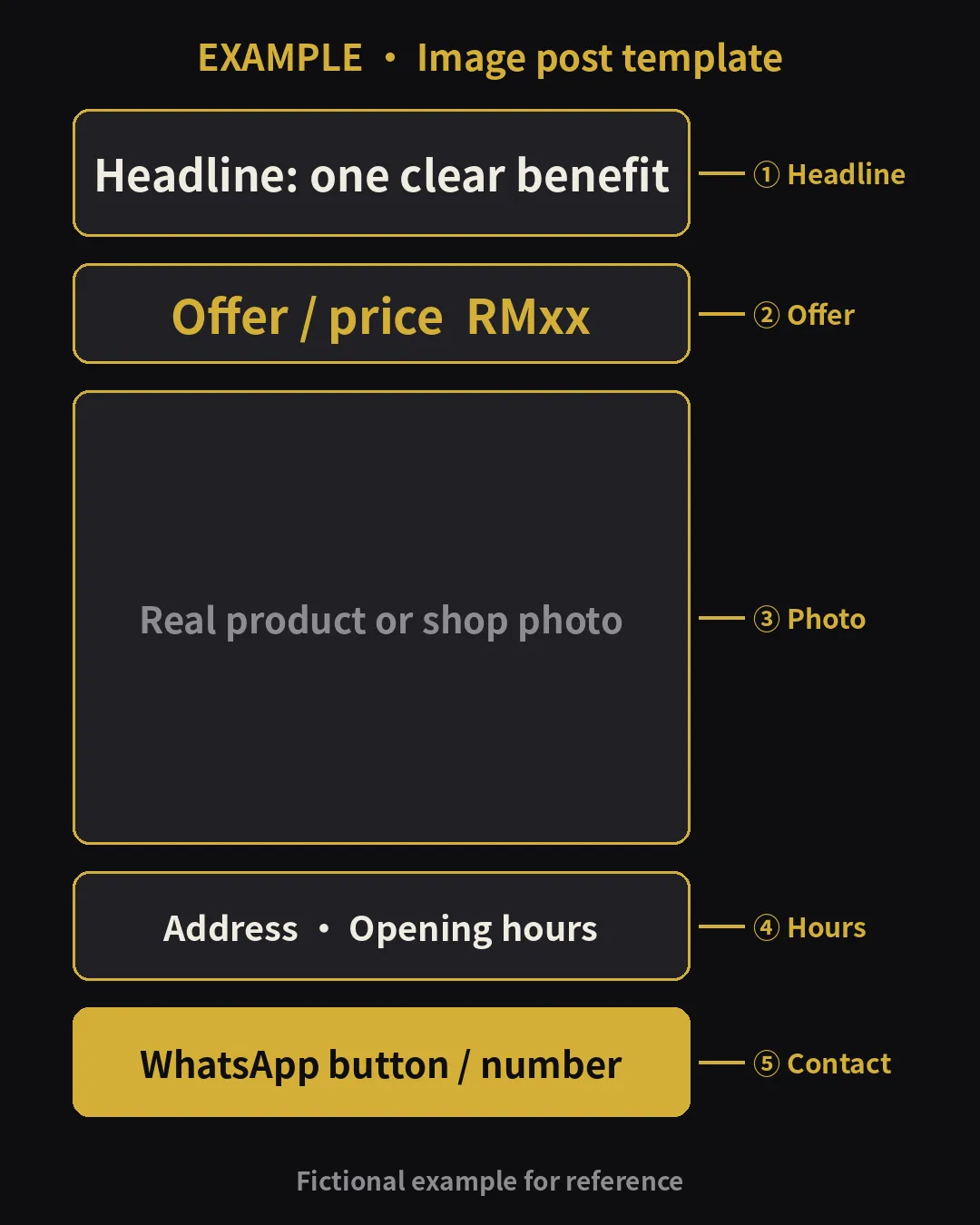
Caption template (fill in the blanks):
[______ (one-line benefit)]
This week: ______ for only RMxx (until __/__)
📍 Address: ______
🕘 Opening hours: ______
💬 WhatsApp: ______ (tap the link to ask us)
#______ #______
Example B: 15-second video template

| Time | Shot | Subtitle example |
|---|---|---|
| 0–3s | Hook: a common customer problem or a close-up of the result | “Have you had this problem?” |
| 3–8s | Process / product: hands at work, machine running, service in progress | “Here’s how we do it” |
| 8–12s | Proof / detail: the finished result, close-up details | “The finished result — see the details” |
| 12–15s | Call to action: shop name, address or WhatsApp | “Want to know more? WhatsApp us” |
5 tips for shooting short videos on your phone

- Shoot vertical (9:16): Reels and TikTok are full-screen vertical.
- Key point in the first 3 seconds.
- Enough light: window light or bright shop lights is enough for a phone.
- Add subtitles: many people scroll with sound off.
- One idea per video: explain one selling point in 15–30 seconds.
How YF ADS(颖峯)can help
For images, we offer graphic design: ad visuals, promo and event designs. For video, we offer video production: short-video topics, scripts and editing, subtitles and key messages, with filming scope and deliverables confirmed per project, for use on your page, Reels, TikTok or ads. Video production is quoted per project, based on number of videos, filming time and location.
To run ads with the content, combine it with Facebook ads, TikTok ads, or our social media management. Ad budget is separate and paid directly to Meta or TikTok.
FAQ
What’s the main difference between images and videos?
Images make information clear at a glance and are easy to save and share; videos show atmosphere, process and people, and make people stop more easily while scrolling.
Which signals do platform recommendations look at?
According to official docs: stopping on a post, watching to the end, likes, comments, shares, saves, follows, plus captions and hashtags. Marking “Not Interested” also affects recommendations.
Are images at a disadvantage in the algorithm?
Not necessarily. Images earn signals through stops, saves, shares and clicks; videos add watch time. Using both is safer.
If I post videos, will the platform push them automatically?
No. Content needs to hold attention and get interaction to have a chance, and nobody can guarantee views.
How much does YF ADS charge for video production?
Video production is quoted per project, based on number of videos, filming time and location. WhatsApp us for details.
About YF ADS
YF ADS is a small ads team based at Gala City, Kuching. We plan and run Facebook, Instagram and TikTok ads and look after business pages for small businesses across Malaysia. These articles explain how we approach the work; results depend on each business, so we don't promise fixed enquiries or sales.
More about us →