
Contents
Many owners running ads for the first time hit the same wall: Ads Manager shows plenty of people saw the ad, some even clicked, yet the phone barely gets any WhatsApp messages. Money is going out and it is not clear where things are breaking.
Short answer: Views without WhatsApp messages usually do not mean the ad “doesn’t work”; one step between seeing and asking is broken. The five most common reasons: the copy does not say who it is for, there is no pre-filled opening message, replies are slow, there is no price guidance at all, or the ad objective or audience is wrong. Check click rate first, then message volume, then sales, and change one thing at a time.
This is very common. Let us break it down step by step.

Impressions, clicks and enquiries are three different things
Impressions: the ad appeared
An impression only means the ad showed up on someone’s screen. They may have scrolled past in under a second. Lots of impressions do not mean people understood what you sell.
Clicks: some interest
A click means they want to know a bit more. But after WhatsApp opens they still have to type and press send, and that is often the biggest hurdle.
Enquiries: they are willing to ask
Sending a message shows some trust and real need. Look at how many people drop between each step, not only the impressions at the top.
Reason 1: the copy does not say who it is for
Many ads look nice but do not say what is sold, who it suits or where. If people do not get it, they will not ask.
- Say the service and the audience in the first line, e.g. “For homeowners planning a kitchen renovation”.
- State the service area so people outside it do not click for nothing.
- Add one clear next step, such as “WhatsApp us for a quote”.
Reason 2: the WhatsApp chat is hard to start
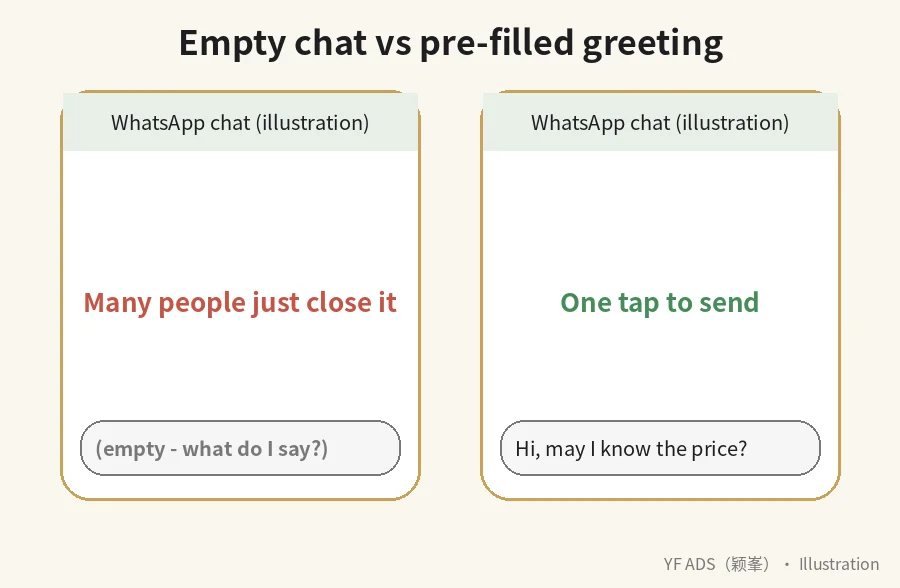
If the chat opens empty, many people do not know what to say and simply close it.
- Set a pre-filled greeting in the ad, e.g. “Hi, may I know the package price?”
- Keep it short and natural so one tap sends it.
- Try two or three greetings and see which gets sent more.
Reason 3: replies are too slow
People often message several businesses at once. Reply hours later and they may have moved on. This never shows in Ads Manager, but it hits sales directly.
- Set a WhatsApp Business away or greeting message so they know you received it and when you will reply (see WhatsApp: How to use away messages).
- Prepare reply templates for common questions.
- Schedule ads mainly for hours when someone can reply.
Reason 4: no price guidance at all
Not showing prices is not always wrong, but with zero idea some people worry it will be expensive or that they will be chased, so they do not ask.
- Show a “starting from” price or a rough range so customers have a reference.
- Explain what affects the price.
- If you really cannot show prices, say “free assessment, no obligation” to lower the pressure.
Reason 5: wrong objective or audience
With an engagement or traffic objective, the system finds people who like or click, not necessarily people who message. Audiences that are too broad or too narrow also affect lead quality.
- If you want WhatsApp enquiries, choose a messaging-related setup with WhatsApp as the destination (see Meta: How to create ads that click to WhatsApp).
- Keep targeting simple at first so the system has room to find people.
- Read the enquiries regularly to judge whether they are the customers you want.
Which step to check first
- Low click rate: fix the image and first line of copy.
- Clicks but few messages: fix the opening message and price info.
- Messages but few sales: look at reply speed and follow-up.
Change one thing at a time so you know what made the difference. For the creative itself, see Ad images and copy that make people stop.
Want help reviewing your setup? See our Facebook ads service.
Related articles: Ad images and copy that make people stop | How to split your Facebook ad budget | Facebook ad rejected or account restricted | How to reply to WhatsApp enquiries from ads
FAQ
Do high impressions mean the ad is good?
Not necessarily. Impressions only mean people saw it; look at clicks and enquiries too.
Do I have to set a WhatsApp pre-filled message?
Not required, but it makes the first message easier, so it is worth trying.
How long before I judge whether an ad works?
There is no fixed number of days. Let it run a few days and gather data before adjusting; changing too often makes it harder to tell.
Lots of enquiries but nobody buys. Is it the ad?
It could be the audience, or the reply, price or follow-up. Read the conversations to judge.
About YF ADS
YF ADS is a small ads team based at Gala City, Kuching. We plan and run Facebook, Instagram and TikTok ads and look after business pages for small businesses across Malaysia. These articles explain how we approach the work; results depend on each business, so we don't promise fixed enquiries or sales.
More about us →