
Contents
The ad is ready, you hit publish, and a while later a notification arrives: “Your ad was rejected.” Worse, sometimes the whole ad account gets restricted. Many owners panic or open a new account straight away. It usually helps more to calmly check the reason and follow the proper steps.
Short answer: First work out whether one ad was rejected or the whole ad account is restricted. For a rejected ad, check the reason in Meta Business Support Home, edit it if it really breaks a rule, or request a review if you think it is a mistake (usually within about 24 hours), and do not delete the rejected ad first. For a restricted account, an admin requests a review from Account status overview (usually about 48 hours). Opening a new account to get around it is not recommended.
Rejected ad or restricted account?
Rejected ad
Only that ad does not meet policy; other ads and the account still work. Edit it or request a review.
Restricted account
The ad account, Page, profile or business portfolio is restricted from advertising. The impact is bigger and you need the account review process.
Common reasons Meta rejects ads
According to Meta’s Help Center, ads may be rejected if they:
- do not comply with the laws where the advertiser is located;
- discriminate against certain groups;
- promote products, services or offers through deceptive or misleading practices, such as scams for money or personal information;
- do not follow the Community Standards, Advertising Standards, Commerce Policies or other terms.
In practice, owners most often run into:
- Exaggerated or guaranteed results: “lose 10 kg guaranteed”, “100% profit”.
- Copy implying personal attributes: e.g. “Are you in debt?”
- Restricted industries: finance, health, supplements, alcohol and others have extra rules.
- Landing page problems: broken links or content that does not match the ad.
- Misleading visuals: fake system buttons or notifications.
How to handle a rejected ad

- Read the notification and reason: it links to Meta Business Support Home, where the rejection reason is shown.
- Decide: edit or appeal. If there is a real issue, edit the image, text, audience or landing page in Ads Manager; edits are sent for review automatically. If you think it is a mistake, request a review.
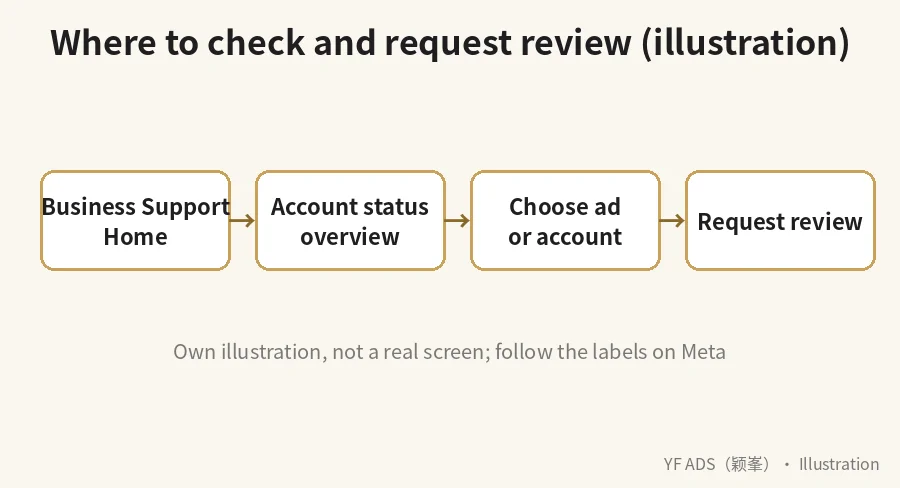
- Request a review: in Business Support Home, select the rejected ad, click “Request review” and submit.
- Do not delete the rejected ad first: once deleted you may not be able to request a review.
Meta says ad reviews are usually completed within 24 hours, sometimes longer; you can track progress in Business Support Home.
How to appeal a restricted ad account
- Go to Business Support Home and choose “Account status overview” on the left.
- Select the restricted account.
- Under “What you can do”, click “Request review”.
- Follow the on-screen steps.
- Only an admin of the account can request a review.
- Reviews usually take about 48 hours, sometimes longer.
- Appeals are limited and the decision after review is final, so understand the issue before submitting.
- After the account is restored, previous ads do not restart automatically; turn them on in Ads Manager.
How to reduce rejections
- State facts; do not guarantee results.
- Do not use “you” to imply health, financial or physical conditions.
- Check whether your industry has special rules before running ads.
- Make sure the landing page works and matches the ad.
- Do not open new accounts to get around a restriction; it can make things worse.
Official references: How to troubleshoot a rejected ad and Request a review of a restricted ad account (Meta), plus the Meta Advertising Standards. For writing compliant creative, see Ad images and copy that make people stop. Need help? See our Facebook ads service. We cannot guarantee appeal outcomes.
Related articles: Ad images and copy that make people stop | Ads get views but no WhatsApp messages | How to split your Facebook ad budget
FAQ
Does one rejected ad affect the whole account?
A single rejection usually only affects that ad. But Meta notes that repeatedly running violating or low-quality ads can lead the system to treat ads from the same Page, domain or account as lower quality.
How long does a review take?
Meta says ad reviews are usually within 24 hours and account restriction reviews about 48 hours; both can take longer.
My account was restricted. Can I just open a new one?
Not recommended. Follow the official review process and find the cause first.
Will requesting a review hurt my account?
Meta says requesting a review does not affect your standing on the platform.
About YF ADS
YF ADS is a small ads team based at Gala City, Kuching. We plan and run Facebook, Instagram and TikTok ads and look after business pages for small businesses across Malaysia. These articles explain how we approach the work; results depend on each business, so we don't promise fixed enquiries or sales.
More about us →